Implementing a new LMS? How hard is it to author and launch the initial course?
A local post secondary career business school has hired a strategic technology consulting firm, to install a custom Learning Management System (LMS) to launch their new subdivision of online learning.
Moodle was selected for the LMS because of its usability and efficient price structure. A research strategy is being considered to establish current practices for transitioning classroom to online learning.
The project was framed with Microsoft Project and Excel spread sheets in order to get ballpark costs and a tentative timeline. A wiki was used to keep the information organized and to allow for comments by the Harrisburg University Department Chair, Andy Petroski, project supervisor.
Project Goal
· Transition a post-secondary classroom course into an online computer based learning course
· Produce a business math class with electronic keypad that integrates subject matter with online learning requirements, course materials, and learning objectives
· Produce an effective online learning course that profiles the needs of a career school online learner
Project Objectives
· Identify course subject, instructor and materials
· Identify online learning requirements
· Identify course objectives
· Design flow chart
· Design storyboard
· Develop course prototype on Moodle
· Implement course prototype
· Evaluate prototype
Project Milestones
· Research
· Design
· Create media
· Develop
· Evaluation


Budget
Costs for the course from an instructional designer standpoint will be approximately $12,000 to $13,000. Development will take place in-house and development cost estimates are unavailable.
Research Goals
Research questions were established in order to consider the best practices for transitioning to online learning. Research interview methods included questionnaires, phone calls and e-mails. Much of the research included interviewing industry leaders, academic searches and cutting edge publications by field experts.
Project Conflicts
The Learning Course Management system must be up and running before the course is authored. An exact instance of Moodle may be replicated for sandbox purposes if it matches the course. Currently, the school is deciding between Moodle 1.9 and 2.0. Plug-ins can be hyper sensitive to different versions of Moodle. Changing versions in the middle of course authoring is not recommended as it can become quite costly.
School Philosophy and Goals
The research on the school was an accumulation of campus interviews, questionnaires, phone calls and e-mails. Interviews with the course instructor, gave further insight into the school mission and learner profile.
School Profile
The school is a career college that offers Associates degrees and Certification in business and medical office management, Legal and Administrative Assistance.
Projected Growth
The online branch is pictured to include all current courses, additional courses and bachelor's degrees. The career school will offer students a choice between classroom and online learning so that they have more flexibility. The course will emphasize interactivity with audio options.
Online Learner Profile
Most of the students that are enrolled do not have jobs or if they do, they have them at night. The business school’s Associate in Specialized Business (ASB) degree and diploma programs are designed to serve people with various types of training needs:
(1) those who are seeking entry-level office or management-trainee positions,
(2) those who are already employed but need to further develop skills or acquire new ones, and
(3) those who have previously worked in an office and are now considering resuming their career and need to update their skills.
An individualized, problem-solving approach effectively meets the needs of each of these groups.
Course selected
Business Math with Electronic Calculator is a two credit core course that is required by all incoming students. The current course instructor is a long time employee for the business school. The course comes with a book that is owned by the school. The challenge is to repurpose it for the web. Research methods included an interview with the subject matter expert and analysis of comparable online courses.
Course Objectives
· Develop basic business mathematical skills.
· Perform Mathematical computations involving whole numbers, fractions, decimals, and percentages.
· Demonstrate mastery of basic business mathematical operations using the electronic calculator.
· Demonstrate mastery of converting fractions to their decimal equivalents.
· Use the accumulator function keys to solve mixed calculation problems.
· Improve accuracy on the electronic calculator keypad by participating in five minute timings.
Course Materials
An industry standard keypad was extensively researched. Considerations were made from similar courses and current professional standards.
Course Conflict
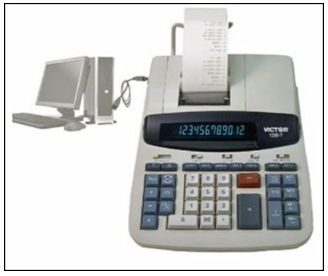
After extensive research, an USB keypad was selected to replace the electronic calculator


The difference in the interface was problematic because the course emphasized memorization by touch. Students in the classroom would memorize a different interface then the online learner, making the blended approach challenging.
Government Regulations
A strong consideration for any accredited institution that receives federal financial aid is that it complies with state and federal laws. In case of an audit, the school would need to demonstrate steps taken towards class instruction requirements and accessibility.
The research questions that were selected for the project were related to compliance with government regulations. Course design was based on requirements listed from the PA Department of Adult Education and the Federal Department of Education. An interview with Patricia Landis, the PA-DOE Divisional Director of Occupational Training, and Keith Green, the Director of Institutional Compliance and Reporting at Harrisburg University helped clarify government regulations.
Pennsylvania requires fourteen to fifteen hours of class instruction for each semester credit. Two hours of homework are required for each one hour of instruction.
A PA online course follows a similar formula. Thirty hours are direct instruction, the learner is taught the subject matter through interactive reading and screen capture. Approximately 60 hours would be indirect instruction, interactive drill. The course was determined to be ninety hours for the two credit class math class.
508 Requirements
Patricia Landis, the Pennsylvania Department of Education Divisional Director of Occupational Training, stated that Pennsylvania does not currently have any 508 requirements for online learning. That is the Federal government’s role.

Development considerations from the Federal Department of Education for Accessibility and 508 Compliance are based off of 1194.22 Web-based intranet/internet information and applications.
Federal 508 compliance and standards will be taken into consideration for persons with accessibility needs as the school receives federal financial aid for students and may be subject to auditing. The following federal compliance standards were taken into consideration with the design and development stage.
· Team developers will adhere to the accessibility guidelines by providing a short description for non-textual items in the HTML code.
· Images do not need a verbal equivalent as that is automatically generated by accessibility readers.
· Text should be synchronized with audio and visual components.
· Using color as an option for making a selection, such as “click on green for yes and red for no” will be avoided as this affects those with color blindness.
· Row and column headers with corresponding cells shall be implemented.
· Frame titling shall correspond with indentifying text.
· Plug-ins must comply with 508 standards and links provided.
· Timed tests should be allowed to assist persons with mobility impairments to be alerted and extend the time if necessary.
Current Industry Practices
Current industry practices were a consideration because of the cutting edge style of the course. Fresh material from industry experts, preferably still working in the field was pivotal. Interviews with Dr. Larry Ragan at Penn State World Campus Online and David Runyon, Harrisburg University Campus Librarian established research criteria. Google Scholar Search and the HU Library database produced interesting finds through Michigan State University and several textual publications addressing current trends.
Industry Standards
The Michigan State Virtual University of Design and Technology addresses the adult learner pedagogy model. It suggests that the course content be made relevant for the learner and that the lesson times be clearly laid out. Course content will include a relevant storyline to interest the learner. The storylines will show the learner how a person might apply business math skills in a variety of career related tasks. Learners will also be shown that they have already used math skills in real life settings.
Every lesson activity will give the learner an approximate time to complete. Learners will keep track of their times in a separate time card spread sheet. Learners that complete the task before the time expiration will not be penalized. Instructors can change times in future courses by averaging out results.
Penn State World Campus
An interview with Lawrence Ragan (2010), Penn State Director of Instructional Design & Development, Continuing and Distance Education/World Campus, highlighted five key industry standards for transitioning classroom to online learning. Course content will naturally drive most design considerations. Blended learning, asynchronous and synchronous instruction delivery must be carefully considered before designing the course. Transactional interactions will play a large part in the development phase and can greatly enhance user experience. Student activities can bridge the social gap in online learning by breaking out into social group projects such as educational wikis or Moodle forums. Finally, evaluation and assessment can not only help reinforce skills, but allow the instructor the means to measure learning.
Pitfalls to be Avoided
During the interview, Dr. Ragan suggested to find practical guides for building online courses rather than research theory articles. Dr. Ragan prefers to map out new courses by building a timeline using the syllabus. He recommended starting out with the bare bones from the syllabus and from that, build out course content. Many interactive flash modules work great as plug-ins to the course content as the course is authored. Dr. Ragan advised to look for a good model or two for reference. He also recommended viewing both similar and different models to the business math course. To avoid costly pitfalls, consider the following:
During the interview, Dr. Ragan suggested to find practical guides for building online courses rather than research theory articles. Dr. Ragan prefers to map out new courses by building a timeline using the syllabus. He recommended starting out with the bare bones from the syllabus and from that, build out course content. Many interactive flash modules work great as plug-ins to the course content as the course is authored. Dr. Ragan advised to look for a good model or two for reference. He also recommended viewing both similar and different models to the business math course. To avoid costly pitfalls, consider the following:
· Use practical guides rather than academic research journals.
· Do not re-invent the wheel; find one or two good models to use as an example.
· Start uploading the course barebones; enhance it later if there is time.
Current Trends
According to Graphics for Learning by Ruth Colvin Clark and Chopeta Lyons (2004), Research has demonstrated that the concept of using visual representation along with text assists learners with high visual spatial aptitudes. The current trend toward learning occurs when visuals are relevant, simple, clean and not distracting. The business math course will use simple visual representations that are relevant to content.
Technology enhanced learning best practices by Miltiadis D. Lytras, Dragan Gasevic, Patricia Ordonez de Pablos and Weihong Huang (2008), illustrates the concept of metacognition as today’s learning trend. Learners should be able to observe their progress continuously so that it is easy for them to self-monitor and make improvements. Moodle makes it simple to provide feedback to student’s as they move forward.
The Future of Online Learning
Collaboration is addressed in the book, Enhancing e-learning with Media-Rich Content and Interactions by Richard Caladine (2008). The future in e-learning will lean toward more collaborative approaches. Wiki’s, forums, screen capture, pod casts, and blogs will be more heavily used in asynchronous learning, as the social aspects give the student more of a classroom feel. The business math course design will include a forum for assignment reflections through Moodle.

Learning Management System
Jason Brandt, the HU Moodle Coordinator, was interviewed as a field expert on Moodle Learning Management systems. He was a wealth of expertise and explained the many features of the Moodle interface. A sandbox was set up for experimentation with the many different options of the LMS. He suggested exploring Moodle.org forums for further study. The following are questions that were asked during the interview.
What are the current practices of transitioning classroom to online learning in Moodle?
Repurposing course content and then adding questions into the question pool will help generate questions for quizzes.
What limitations does the designer need to consider for the development phase?
One of the most important things that a designer must take into consideration is the instance of Moodle that the students will be working in.
What considerations should be made to keep the interface more intuitive?
There are several customizable features that can make the user experience more intuitive, such as interface personalization.
What considerations should be made to uniform the interface for future classes?
The Meta tab may be an option as it enables the instructor to build a course for classes with multiple sections.
What kind of plug-ins should be considered? How much will they cost?
While researching plug-ins on Moodle.org, look at the notes section to be sure that it lists the compatibility with the instance of Moodle that will be the end result. The most important consideration is to build Moodle on the same instance that will be displayed to the students.
Research Conclusion
In conclusion, the research was pivotal in bridging an understanding for the amount of work required to transition classroom into online learning. The level of interactivity was really the gauge of the amount of hours that would be required to design, and develop the project.
The most valuable lessons that were realized in the research process were the industry leader interviews. The interviews helped soundboard the thought process and navigated design direction. The interview with Dr. Ragan paved the most appropriate path for this project. His most influential suggestion was to align the course material to the course workbook.
The subject matter expert interview steered the design to serve a larger audience. A design that could be quickly converted into a blended approach could be accessed from a classroom. Interviews with government employees differentiated state and federal requirements. The state requirements focused on course length and direct instruction time. The federal requirements focused on disability access.
Project Design
The project design plan is detailed and linear. Each of the chapters is broken down in alignment with the syllabus and workbook.


Course Introduction

Framework

Development Considerations
An electronic edition of the course workbook was made available on word pad. Content was pasted on chapter placeholders. Text and diagrams were assigned to a developer for basic repurposing in HTML.
Workbook Diagram Example

Power Point Storyboard Template.
Storyboards were created to guide the developer.


Storyboard to Frame
Storyboard and Frame examples were sent to the developer.


Storyboard to Frame


The next step was to utilize the Moodle question pool. The question pool will later serve two purposes. One purpose is to create interactivity for each of the assignments. The second is to recycle questions for quiz and test use, a unique feature to Moodle that conserves instructor time. Later phases will foster more intricate, interactive lessons for each of the Units, repurposing the graphics for like assignments whenever possible. The design approach is to build out evenly rather than linearly. Interactive assignments will be spread out.
Workbook questions were pasted into question pool placeholders. The developer was assigned to go back through and upload the questions individually.

Storyline
Finally, the storyline component focuses on a more personal feel. The storyline would use realistic scenarios to get the learner thinking about how they already use the very math that they are studying in real life. For example, a student may reconcile their checkbooks every month after receiving their bank statements. They can easily transfer these skills to a corporate checking account.
The storyline design will demonstrate some of the career paths that the learner might choose through the business school. Another example, a medical office manager may assign an assistant to calculate the number of patients that will be requiring flu shots in the winter months. She will need to quickly estimate her assistant’s calculations to assess her work.
Design Validation
The marketing firm provided a favorable response to the storyline. The marketing firm was treading through new territory and was unfamiliar with the limitations of Moodle. The interactivity that they were looking for would require a variety of plug-ins that could be fickle toward different Moodle versions. Unfortunately, the firm was having a difficult time finding a satisfactory host for their learning management system and was contemplating using Moodle 2.0 instead of Moodle 1.9. The project has been placed on hold while they further review the process.
Afterword~Project Design Conclusion
Goals for my personal education experience were realized with my desire to understand Learning Management Systems, 508 compliance, and Moodle more thoroughly. I have a much better understanding about the amount of development hours required to make highly interactive and engaging lessons. The amount of hours involved with making the course as interactive as the client wanted were far above and beyond the requirements of the practicum and would require a team commitment with expert developers. I was grateful for the experience, though a little disappointed to not see the project realized to the very end. It is my hope that another student carries the torch to finish the project down the road with the marketing firm or directly with the school when they are able to move forward with the project.
References
"Austin Community College Catalog." ACC NT WWW Server. Web. 01 Feb. 2011. <http://www3.austincc.edu/catalog/fy2008/descofst.htm>.
Brandt, Jason. "Moodle Overview." Personal interview. 21 Oct. 2010.
Caladine, Richard. Enhancing E-learning with Media-rich Content and Interactions. Hershey: Information Science Pub., 2008. Print.
"Computerized Accounting Management." Consolidated School of Business: Business, Medical, Legal, and Computer Training in York and Lancaster PA. Web. 27 Sept. 2010.
CreataVivendi | Interactive, Custom Applications, Marketing to Hispanics, Search Marketing, Mobile, Print. Web. 09 Sept. 2010.
"Cuyahoga Community College." Home. Web. 25 Jan. 2011. <http://www.tri-c.edu/programs/Pages/default.aspx>.
CreataVivendi | Interactive, Custom Applications, Marketing to Hispanics, Search Marketing, Mobile, Print. Web. 09 Sept. 2010.
"Cuyahoga Community College." Home. Web. 25 Jan. 2011. <http://www.tri-c.edu/programs/Pages/default.aspx>.
"Factors to Consider." VuDAT (Virtual University Design & Technology). Web. 18 Nov. 2010. <http://vudat.msu.edu/design_factors/>.
Green, Keith. "Director of Institutional Compliance & Reporting, Harrisburg University." Telephone interview. 12 Dec. 2010.
Landis, Patricia. "Pennsylvania Department of Education Divisional Director of Occupational Training." Telephone interview. 25 Jan. 2011.
Miltiadis D. Lytras (The American College of Greece, Greece ); Dragan Gasevic (Athabasca University, Canada); Patricia Ordonez De Pablos ( Universidad De Oviedo, Spain); Weihong Huang (Kingston University, UK). Technology Enhanced Learning: Best Practices. IGI Global, 2008. Print.
"Pedagogy." Web log post. Moodle.org. Web. <http://docs.moodle.org/en/Pedagogy>.
"Postsecondary & Higher Education." Office of Postsecondary and Higher Education (OPHE). Web. 20 Nov. 2010. <http://www.education.state.pa.us/portal/server.pt/community/postsecondary___higher_education>.
"Private Licensed Schools." Private Licensed Schools (Post-secondary Career and Trade Schools). Web. 22 Dec. 2010. <http://www.portal.state.pa.us/portal/server.pt/community/private_licensed_schools/8720>.
Ragan, Lawrence C. "Director; Faculty Development; World Campus Faculty Development Community." Telephone interview. 12 Nov. 2010.
Runyun, David. "Harrisburg University Campus Librarian." Personal interview. 12 Jan. 2011.
Ruth Colvin Clark and Chopeta Lyons. Graphics for Learning. 2004. Print.
"Specialized Associate Degree Programs." Specialized Associate Degree (ASB/AST). Web. 22 Dec. 2010. <http://www.portal.state.pa.us/portal/server.pt/community/specialized_associate_degree_programs/8721>.
US. U.S. Department of Education. Assistive Technology Team. Testing for Web Accessibility Compliance under Section 508 of the Rehabilitation Act of 1973. By Don Barrett. Web. Jan.-Feb. 2011. <http://www2.ed.gov/policy/gen/guid/assisttesting.html>.
"Web-based Intranet and Internet Information and Applications (1194.22)." United States Access Board. US Dept. of Education. Web. 21 June 2001. <http://www.access-board.gov/sec508/guide/1194.22.htm>.

